

Pre-Qualifying a Solar Lead From the Address — and Proposing the Same Day
An address is enough to answer most of the questions that decide whether an appointment is worth the drive: which utility serves the home, whether the roof has good faces and sun, how old the aerial image is, and whether anything rules the job out. In Cali-Graf, the free design and proposal app built by Cali Energy, a Los Angeles solar and roofing contractor, that's a new calculation, the address, the line under it and a quick pass in the roof editor with the sun map, before you leave the office. Arrive with the roof already designed, and the appointment becomes a same-day proposal: add the bills, adjust the layout with the customer, calculate two options and make the PDF at the table.
Before the appointment: what the address tells you
| Check | Where in Cali-Graf | Good sign | Worth a call first |
|---|---|---|---|
| Utility | The line under the address | LADWP · Zone 1/2, SCE … Baseline region … | A red tariff not supported yet — Glendale, Burbank, Pasadena or another city utility: the roof can be designed, but no bill calculation or PDF |
| Coverage | Under the address | No warning | ZIP … not in reference table — the home is likely outside the area Cali-Graf covers |
| Roof data | Opening the roof editor | The aerial image and heights load | Google has no roof data for this address — new construction or some rural areas; no remote design |
| Image age | The editor's top bar | A recent date, high quality | An old image or medium/low quality — more to confirm on site |
| Sun | Sun on the map | Large yellow-orange faces | Faces mostly purple — heavy shade or the wrong direction |
| Existing solar | The photo | No panels | Panels already on the roof — the calculation assumes no existing system |
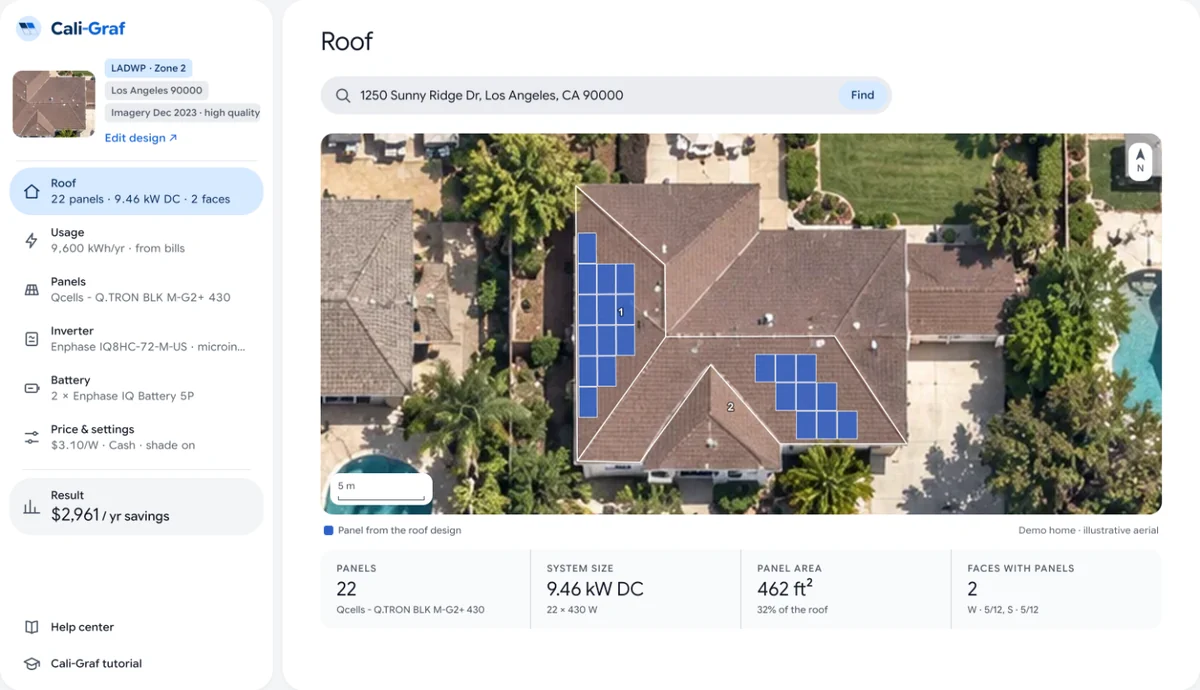
A quick trace of the main faces and Fill roof gives a rough system size — enough to know whether the roof can cover the home's usage before you've seen a bill. Check that the pin sits on the right roof first: an address found through Google is placed approximately, and the image covers about 70 m around it, so a neighbor's house is easy to trace by mistake. The roof steps, and where they mislead, are in designing a solar layout on satellite imagery.
What to ask on the confirmation call
The address can't tell you everything. Four questions fill the gaps:
- "Can you have your last 12 months of bills ready?" Six two-month bills for LADWP, twelve monthly bills for SCE — or the account login for a Green Button file on SCE.
- "Which rate plan is on your SCE bill, and do you have CARE?" It sets the bill today.
- "How old is the roof?" A roof near the end of its life should be replaced before solar goes on — the image can't show its condition.
- "Anything coming that will use more power?" An electric car, a heat pump, an ADU.
Run tomorrow's first address through Cali-Graf now: utility, roof, sun and image date before you drive.
At the table: the same-day proposal
On a phone, before you sit down. Open the calculation, confirm the home, the image and the utility line. Cali-Graf runs in the phone's browser, and the calculator and PDF work there.
Usage. Type the bills in Usage, or, if the customer has the numbers in a spreadsheet or email, copy the column and paste it into the first bill — Cali-Graf fills the rows down. For SCE, pick the plan and CARE from the bill.
The roof, with the customer. On a tablet or laptop, adjust the layout: drop a face they don't want covered, add the garage, move a row off a vent. Complex roofs are faster to edit on a bigger screen than a phone.
Two options. Make a copy of the calculation for the second option — with a battery, or a smaller system — so the customer compares one change at a time; see good, better, best options.
Calculate and make the PDFs. Calculate, then Save PDF on the device you're presenting from — the file lands in that device's downloads. The first calculation of a new house takes a little longer while Cali-Graf fetches the shade data; after that, a recalculation takes seconds and a PDF about half a minute.
Signature. The price sheet ends with an approval naming the option — "I approve Option 2…" — with initial boxes on every page and the right-to-cancel notice at the end. Before any of it goes to the customer, run through the pre-send checklist.
After the appointment
- Send all the option PDFs together, so the customer compares the same numbers on each.
- If utility rates change before they decide, the calculation shows Rates updated — recalculate; calculate again and send a fresh PDF.
- Daily limits. Each account has a daily fair-use limit on new houses; pre-qualifying many addresses in one day can reach it. Houses you already opened keep working.
Frequently asked
How do I pre-qualify a solar lead before the appointment?
What rules a home out before the visit?
Can I make a solar proposal during the appointment?
Does Cali-Graf work on a phone?
Is there a limit on how many addresses I can check?
Related reading
Sources & methodology
Product facts on this page come from Cali-Graf's own help center and the pages linked below; figures in examples come from the stated inputs. Features, limits and supported utilities change; each was verified October 16, 2026.
- Cali-Graf Help — Find the house
- Cali-Graf Help — Make sure the right house is found
- Cali-Graf Help — Supported utilities and areas
- Cali-Graf Help — Sun map
- Cali-Graf Help — Enter usage from bills
- Cali-Graf Help — Phone and tablet
- Cali-Graf Help — Why the calculator asks you to recalculate
- Cali-Graf Help — Is Cali-Graf free?
- California Energy Commission — Electric Load Serving Entities (service-area map)
- SCE — Time-of-use rate plans
Check tomorrow's leads from the office
Type each address into Cali-Graf, read the utility line, open the roof with the sun map and arrive with the design done — then finish the proposal at the table. Free, with daily fair-use limits; bills are calculated for LADWP and SCE homes, including Clean Power Alliance.
Prepared by Cali Energy, October 16, 2026. This article is for general educational purposes only and is not legal, tax, financial, engineering, or utility advice. Rates, incentives, codes, permit requirements, equipment specifications, prices, and program terms may change; figures and timelines are estimates, not guarantees. Confirm current requirements with the applicable utility, AHJ, program administrator, manufacturer, or a licensed professional. See our Content Disclaimer. Cali Energy · 19201 Parthenia St, Unit E, Northridge, CA 91324 · CSLB #1032379 (B, C-10, C-39)