

Good, Better, Best: Building Two or Three Solar Options a Customer Can Actually Compare
Two or three options help a customer decide; five confuse them. The options worth offering are the ones that answer the customer's real question — should I add a battery? is the premium panel worth it? can I keep the payment low? — and they only help if they're comparable: same roof, same usage, same assumed rate increase, with one thing changed between them. In Cali-Graf, the free design and proposal app built by Cali Energy, a Los Angeles solar and roofing contractor, each option is a copy of the calculation — Make a copy creates Option 2, Option 3 with the home, roof, usage, equipment and price already in — and each gets its own results and its own proposal PDF, which you hand over together. The utility decides what some options are worth: on SCE a battery can lower the bill, on LADWP its value is backup.
Pick the question first
| The customer's question | Option 1 | Option 2 | Option 3 |
|---|---|---|---|
| "Should I add a battery?" | Solar only | Solar + battery | — |
| "What's the smallest system that still makes sense?" | Sized to the usage | Smaller: the best faces only | — |
| "Is the premium panel worth it?" | Standard panel | Premium panel | — |
| "Cash or monthly payment?" | Cash | Loan | — |
| "What will my EV change?" | Today's usage | Usage with the car | — |
Pick one question per set of options. A grid of every combination — three sizes times two panels times battery or not — buries the decision.
Keep the options comparable
The point of an option is the difference, so everything else should stay the same:
- Finish the roof before copying. Every option then starts from the same, correct roof, and you don't trace it twice.
- Same usage and rate increase. A different assumption in one option makes its savings look better for the wrong reason.
- Change one thing. A battery and a bigger system and a loan in Option 2 leaves the customer unable to tell what bought what.
- A different panel size needs a new layout. Panels of another size don't fit the old layout: they turn red until you press Re-lay out in that option, which fills the faces again and shows how many fit. Each option has its own roof, so Option 1 stays as it was.
The battery option depends on the utility
| SCE (Net Billing) | LADWP (net metering) | |
|---|---|---|
| What a battery does to the bill | Stores midday solar for the 4–9 PM peak, when power costs the most — it can lower the bill | Solar sent to the grid at noon is already credited like evening power, so storing it saves nothing |
| Default mode in Cali-Graf | Time-of-use (hold for 4–9 PM peak) | Backup only |
| How to frame the option | Extra savings plus backup | The same savings, plus backup during outages |
On an LADWP home, a "solar + battery" option with the same savings and a higher price is a fair offer — as long as it's sold for what it is: power during outages. Cali-Graf simulates the battery hour by hour in the chosen mode, keeps 20% for outages in every mode, and the battery sheet of the proposal shows what it does. More on presenting it in selling home batteries on LADWP vs SCE.
Cash or loan as options
Every account can quote cash; loan programs appear only for companies whose lender is set up in Cali-Graf. When both are available, cash and loan make a natural pair: the cash option shows the price, payback and 25-year savings; the loan option shows the monthly payment next to the bill with solar — bill + payment — and the 25-year savings after all payments. Keep the system identical, so the only difference is how it's paid for.
Hand them over together
Each option makes its own PDF: the option's name is on the cover, and the approval sentence names it — "I approve Option 2 as described in this proposal…" — so the customer signs for exactly one. There's no single comparison PDF, so give the customer all the PDFs at once and point them to the same few numbers on each:
| Compare | Where it is |
|---|---|
| Monthly bill with solar (or bill + payment) | The cover |
| Solar covers | Your solar system |
| Pays for itself | Your savings |
| Net savings over 25 years | The cover and Your savings |
| Price, or financed amount and payment | Price and approval |
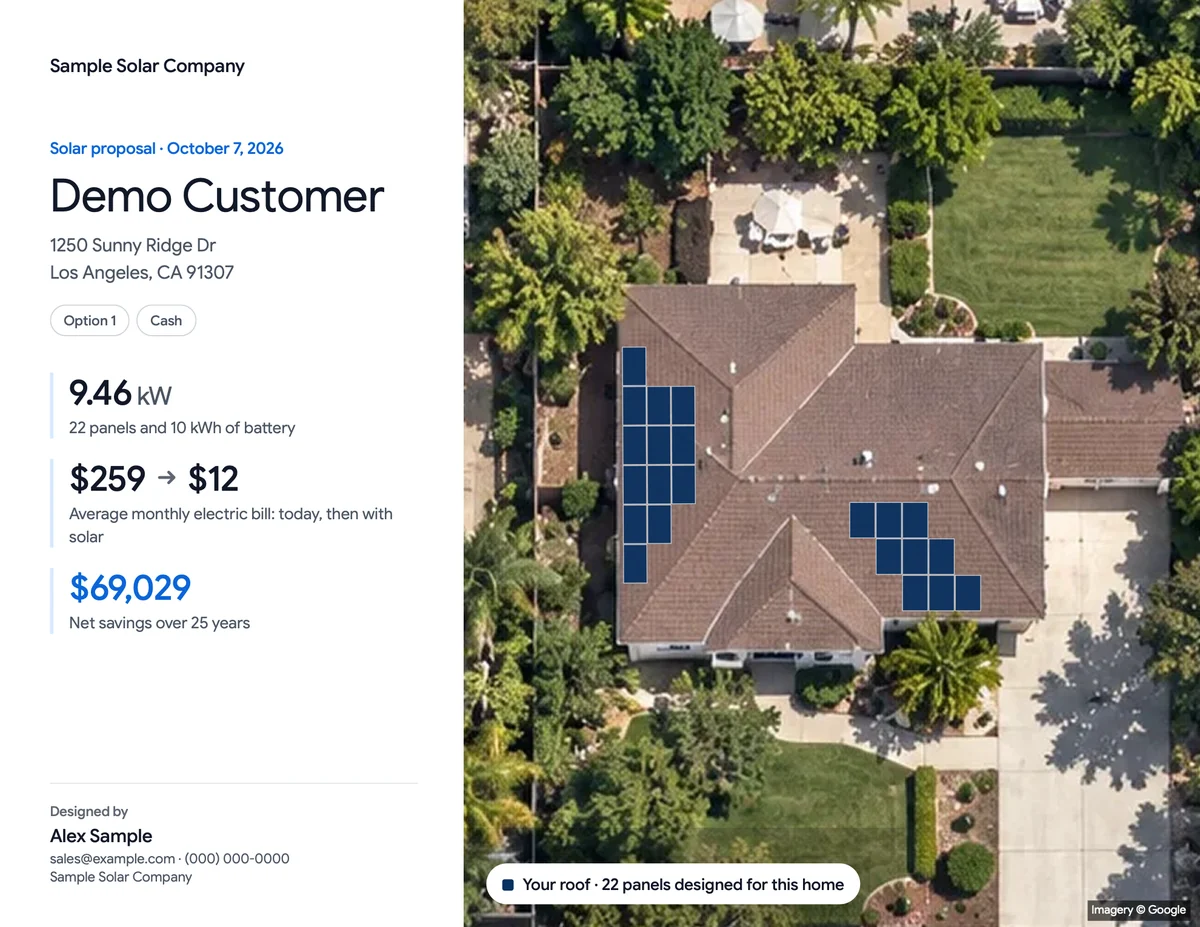
Next customer undecided on a battery? Quote both — same roof, same usage, one difference.
The customer's name is shared by all options — change it in one and it changes in all — and moving one option to Trash leaves the others as they are. What each proposal sheet answers is in the solar proposal, sheet by sheet.
Frequently asked
How many options should a solar proposal include?
How do I make a second option in Cali-Graf?
Should I offer a battery option to an LADWP customer?
Does a battery option save money for SCE customers?
Can I put all options in one PDF?
Related reading
Sources & methodology
Product facts on this page come from Cali-Graf's own help center and the pages linked below; figures in examples come from the stated inputs. Features, limits and supported utilities change; each was verified October 16, 2026.
- Cali-Graf Help — Compare options for one customer
- Cali-Graf Help — Battery operating modes
- Cali-Graf Help — Cash or loan
- Cali-Graf Help — Change the panel after the roof is laid out
- Cali-Graf Help — Proposal numbers explained
- Cali-Graf Help — Customer approval and the 3-day right to cancel
- CPUC — Net Billing Tariff
- LADWP — Net energy metering rates
Build Option 2 in one click
Make a copy of the calculation, change only the battery, the panel or the payment, and hand over a PDF for each option with the option named in the approval line. Free in Cali-Graf, with daily fair-use limits; the mechanics are in its help center.
Prepared by Cali Energy, October 16, 2026. This article is for general educational purposes only and is not legal, tax, financial, engineering, or utility advice. Rates, incentives, codes, permit requirements, equipment specifications, prices, and program terms may change; figures and timelines are estimates, not guarantees. Confirm current requirements with the applicable utility, AHJ, program administrator, manufacturer, or a licensed professional. See our Content Disclaimer. Cali Energy · 19201 Parthenia St, Unit E, Northridge, CA 91324 · CSLB #1032379 (B, C-10, C-39)