

Who Sees Your Customers in Cali-Graf? Privacy for Installers
In Cali-Graf, the free solar design and proposal app built by Cali Energy, only you see your calculations and your customers' details. Other users see nothing of yours, Cali Energy's sales team sees nothing, and the people who run Cali-Graf look at your data only when you ask for help, to investigate a security or technical problem, or when the law requires it. Cali Energy — a solar installer that may compete with you — never uses your calculations to market its own solar or roofing services and never contacts your customers. Under California privacy law, Cali-Graf processes the homeowner details you enter as your service provider.
Why the question matters
Cali-Graf is developed by Cali Energy, a Los Angeles solar and roofing contractor, and it is used by companies that compete with Cali Energy. An installer who types a homeowner's address, usage and name into a competitor's software is right to ask where that goes. Cali-Graf's privacy policy answers it directly: "Cali-Graf is used by companies that may compete with Cali Energy. Your calculations and your customers' details are visible only in your account."
Who sees what
| Who | What they see |
|---|---|
| You | All your calculations, roof designs, proposals and customer details |
| Other Cali-Graf users | Nothing of yours — every request is checked against the calculation's owner |
| Cali Energy's sales team | Nothing — your data is never used to market Cali Energy's solar or roofing services, and your customers are never contacted |
| The people who run Cali-Graf | Your data only when you ask for help, to investigate a security or technical problem, or when the law requires it |
| The property address and location, to find the roof and load the imagery and shade data |
Details: who can see your calculations.
Your customer sees your brand, not Cali Energy's
The proposal a homeowner receives carries only your business card — your name, company, license, phone and email — on the cover, the footer of every sheet and the signature line. Cali-Graf adds no logo or name of its own; in the words of its release notes, "there's nothing about Cali Energy on your proposals." Details: your brand on the proposal.
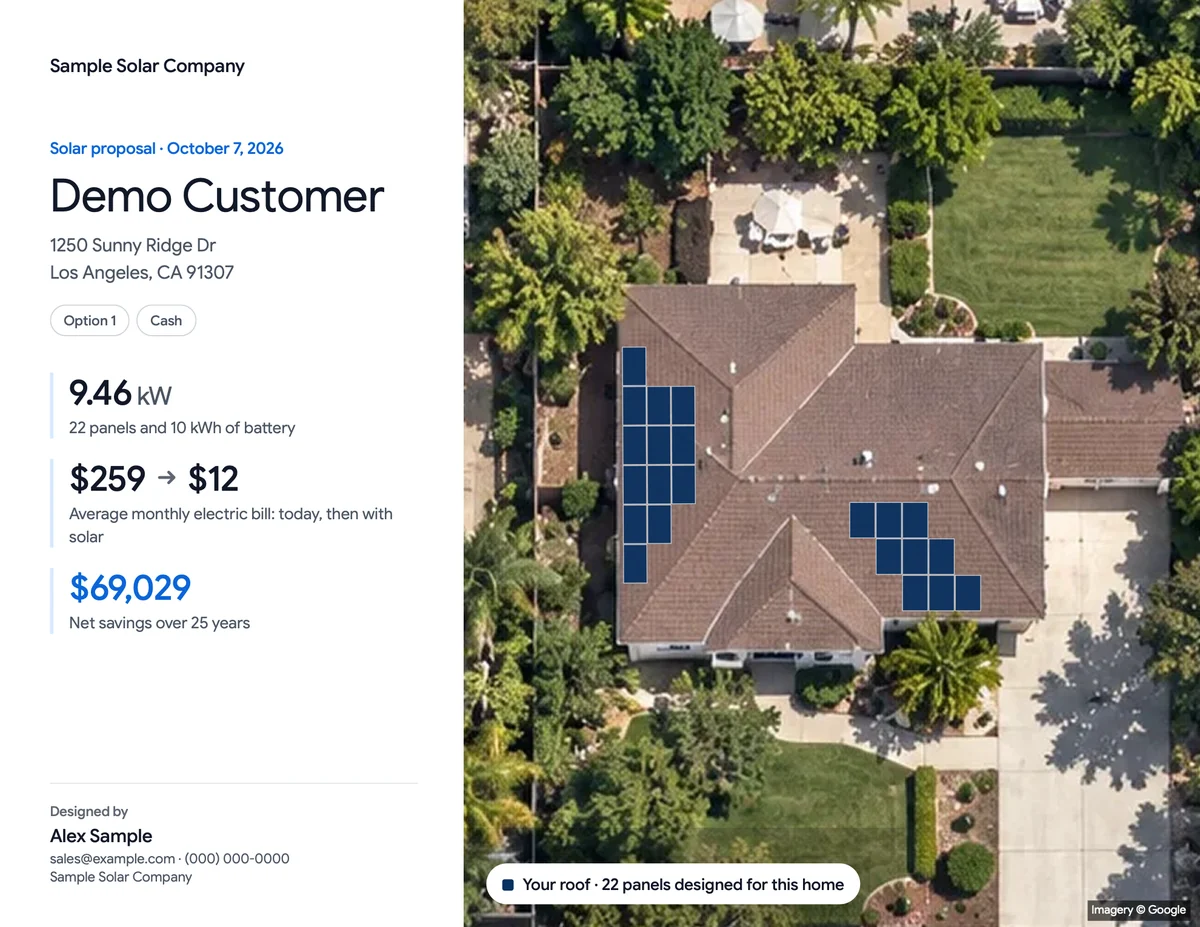
See for yourself: the sample proposal carries only the installer's business card. Then build one under yours.
What Cali-Graf stores, and for how long
What Cali-Graf keeps, from its help center:
| Data | What it is | How long |
|---|---|---|
| Your account | Name, email, photo and account ID from Google; your defaults, business card and tutorial progress | Until you delete the account |
| Calculations | Address and map location, utility and rate, usage, roof design, equipment, price and financing, proposal records, and the customer's name if you enter it | Until you delete them; Trash keeps them 30 days |
| Green Button usage | The usage numbers read from the file — the file itself isn't stored | With the calculation |
| Roof history | Saved versions of each roof design | With the calculation |
| Google Maps data | Roof shape, imagery and shade from Google | Up to 30 days, as Google's terms require |
| Sign-in cookie | One cookie keeps you signed in; only its fingerprint is stored | 30 days after your last visit |
| Server logs and backups | Time, page, result, account ID and a shortened IP address — no addresses or coordinates | Up to 90 days |
Calculations live on Google Cloud servers in the United States, and the site is delivered through Cloudflare. Details: what data Cali-Graf stores.
What Cali-Graf doesn't do
- No selling or renting of personal information, and no sharing it for advertising.
- No advertising trackers, and no analytics inside the app. The public directory pages of cali-graf.com count visits with Google Analytics, with Google Signals and ad personalization turned off; the design app where you work with customers does not use it.
- No keeping calculations after you delete them, beyond the 30 days in Trash and the up-to-90-day backups.
When a homeowner asks about their data
Under the California Consumer Privacy Act, you — the seller — answer a homeowner's request about the data you entered, and Cali-Graf acts as your service provider. The policy's wording: "We process it on your behalf and only to provide Cali-Graf to you … You're responsible for having the right to share it with us. If a homeowner contacts us about their information, we'll refer them to you and help you respond."
To delete a customer's data:
- Find every calculation for that customer in Calculations, by address or name — each option is a separate row.
- Move each one to Trash. After 30 days in Trash, the calculations are deleted for good, with their roof history and proposal records.
- Need it gone sooner? Email calisolargroup@gmail.com from the address on your Cali-Graf account, with the addresses to delete.
- Delete your own copies. PDFs you downloaded are your files — remove them from your computer and wherever you sent them.
Google's roof data for the address is removed within 30 days, and server logs don't contain addresses. Details: delete a customer's data.
Leaving Cali-Graf
- Get a copy of your data: email calisolargroup@gmail.com from your account's address and you'll receive it as a file. There is no self-serve download button.
- Delete your account: Settings → Delete your account removes the account, every calculation (Trash included), roof history, proposal records and customer details at once. Download any PDFs you want to keep first — they can't be made again. Cali-Graf keeps only the reason you gave, how many calculations you had and how long the account existed, without your name, email or any ID. Details: delete your account.
Two limits to know
- No shared team accounts yet. Each person signs in with their own Google account and sees only their own calculations, and calculations can't be moved between accounts.
- The directory is separate. Cali-Graf's public directory offers homeowners a clearly labeled Get a second quote from Cali Energy button on contractor profiles. Requests from that button come from homeowners who press it and go to Cali Energy; they have nothing to do with the calculations installers make in the app.
For how Cali Energy came to build the tool and what it promises installers, see built by a working LA solar contractor.
Frequently asked
Does Cali-Graf share my leads with Cali Energy?
Who at Cali-Graf can see my calculations?
Where is my customers' data stored?
How do I delete a homeowner's data from Cali-Graf?
Does the Cali-Graf app use analytics or ad trackers?
Can I export my data?
Related reading
Sources & methodology
Product facts on this page come from Cali-Graf's own help center and the pages linked below; figures in examples come from the stated inputs. Features, limits and supported utilities change; each was verified October 16, 2026.
- Cali-Graf — Privacy Policy
- Cali-Graf Help — Who can see your calculations
- Cali-Graf Help — What data Cali-Graf stores
- Cali-Graf Help — Delete a customer's data
- Cali-Graf Help — Delete your account
- Cali-Graf Help — Your brand on the proposal
- Cali-Graf — A new proposal: five clear sheets
- California Attorney General — California Consumer Privacy Act (CCPA)
Your customers, your brand, your account
Design, model the bill and send the proposal under your own business card — Cali Energy never sees or contacts your customers. Free, with daily fair-use limits. The binding terms are the privacy policy at cali-graf.com/privacy.
Prepared by Cali Energy, October 16, 2026. This article is for general educational purposes only and is not legal, tax, financial, engineering, or utility advice. Rates, incentives, codes, permit requirements, equipment specifications, prices, and program terms may change; figures and timelines are estimates, not guarantees. Confirm current requirements with the applicable utility, AHJ, program administrator, manufacturer, or a licensed professional. See our Content Disclaimer. Cali Energy · 19201 Parthenia St, Unit E, Northridge, CA 91324 · CSLB #1032379 (B, C-10, C-39)